Address
304 North Cardinal St.
Dorchester Center, MA 02124
Work Hours
Monday to Friday: 7AM - 7PM
Weekend: 10AM - 5PM

Address
304 North Cardinal St.
Dorchester Center, MA 02124
Work Hours
Monday to Friday: 7AM - 7PM
Weekend: 10AM - 5PM

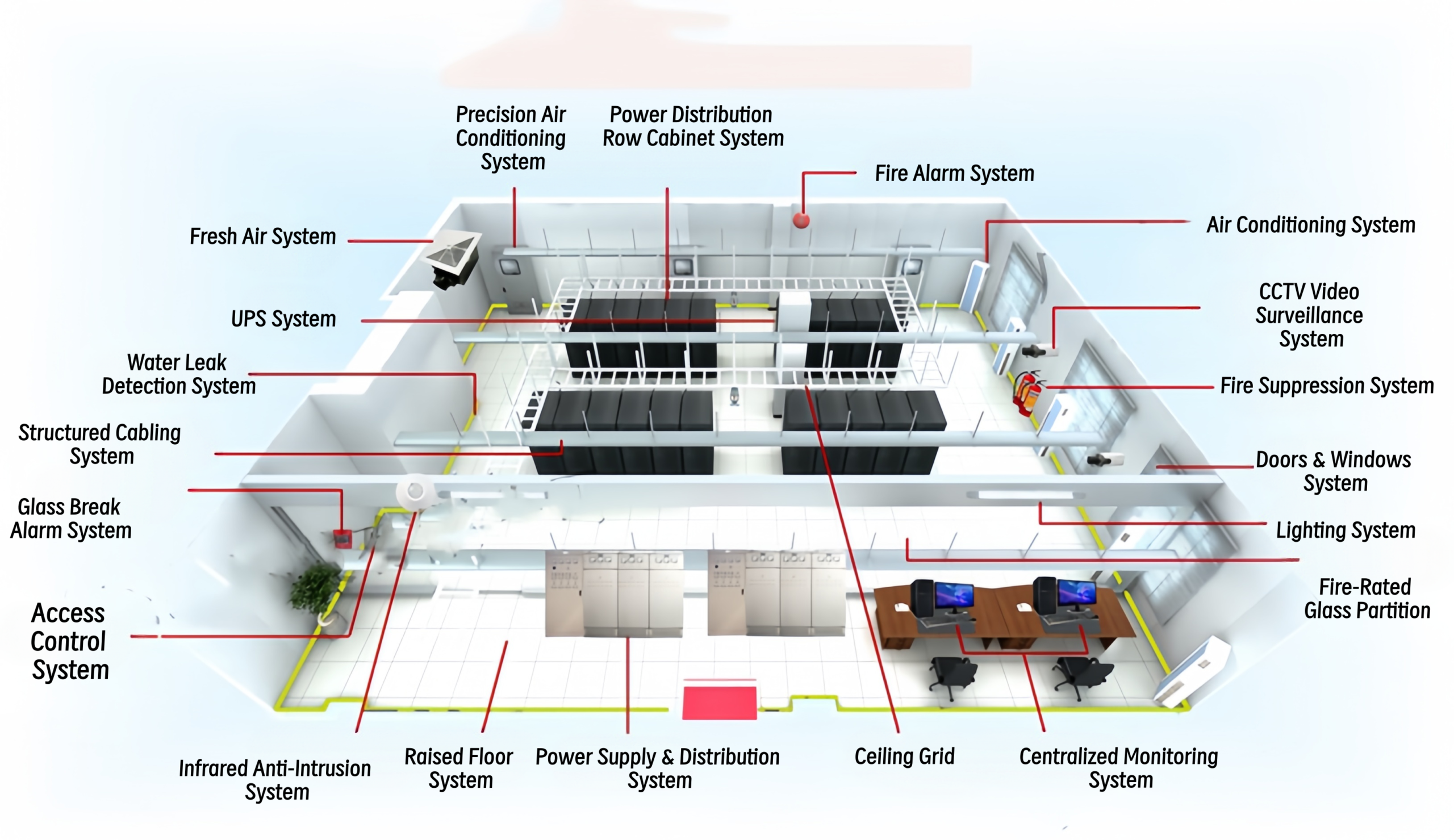
how to build a data center - complete system diagram
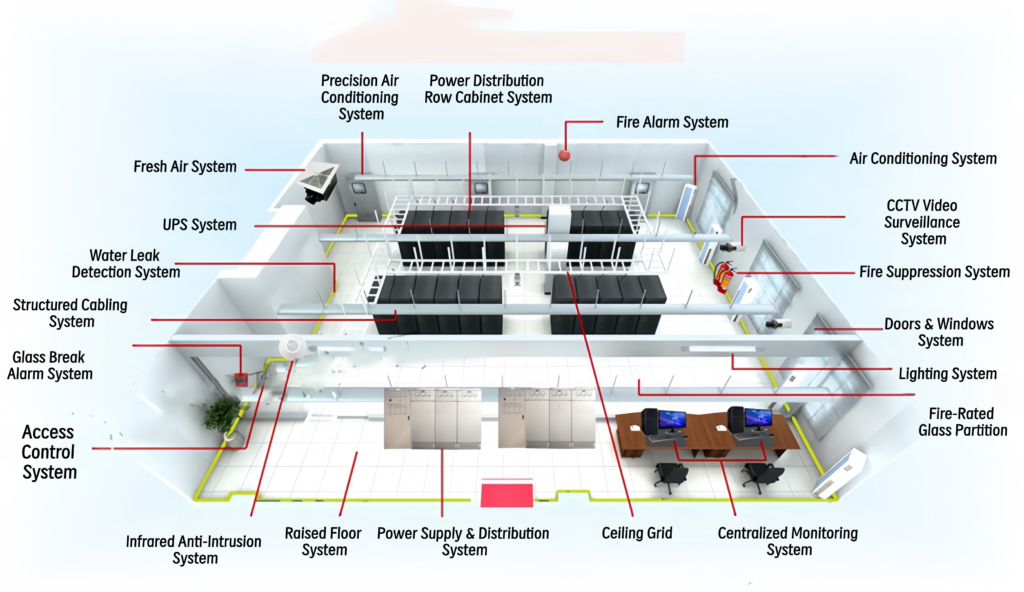
A reliable data center = site selection + design + ten core subsystems + compliant acceptance. Many people think a data center is just “a room with a few racks.” In fact, ten subsystems work together: fit-out, power distribution, UPS, precision cooling, cabling, racks, fire suppression, security, monitoring, and grounding. Skip any one of them, and downtime will come back to haunt you within three years. This guide walks through the entire data center build process, step by step. Use it to review vendor proposals and verify budgets with confidence.
First, define your requirements. Analyze business impact, set RTO/RPO targets, and estimate rack count and power density for the next 3–5 years. Then pick a site: avoid basements and flood zones, avoid strong EMI sources, and confirm floor loading ≥ 800 kg/㎡ (≥ 1000 kg/㎡ for battery and UPS areas).【source】
Next, complete scheme and detailed design. Deliver floor plans, airflow layouts, power topologies, fire zones, and monitoring point maps. Check every parameter against GB 50174-2017.【source】
After that, move into procurement and construction (8–16 weeks). Multiple contractors work in sequence. Photograph all hidden works for documentation.
Then run commissioning and acceptance (2–4 weeks). Test UPS under load, cooling redundancy switching, fire linkage, and power-failure drills, per GB 50462.【source】
Finally, run a 2–4 week trial. Hand over formally after 72 hours of stable operation, along with as-built drawings and O&M manuals.
In total, a traditional data center takes 6–12 months. However, a prefabricated modular data center can compress this to 30–60 days. For this reason, modular designs now dominate: over 60% of new Asia-Pacific data centers in 2026 use prefabricated modular architecture.【source】
This is the core of the guide. Each subsystem follows the same structure: role, equipment list, and selection tips. Copy it straight into your procurement list.
Data center fit-out delivers a dust-free, anti-static, insulated, and fire-rated shell.
Equipment list: anti-static raised floor (≥ 350mm; 400mm recommended), steel or aluminum sandwich wall panels, perforated aluminum ceiling tiles, Class-A steel fire doors, fire-rated glass partitions, 15–20mm rubber insulation under the floor, anti-static coating, stainless skirting, and steel base frames for heavy equipment.【source】
Selection tips: ground all ceiling grids with 6mm² dual-color cable, then bond to the ground bar with 16mm² — contractors skip this step constantly, so check test records. Also insulate under the raised floor to prevent condensation during cooling airflow.
Power distribution feeds utility electricity safely to the UPS, cooling, lighting, and racks.
Equipment list: incoming utility panels, ATS transfer cabinets, UPS input/output panels, row-level PDU cabinets (or busway), rack PDUs, surge protectors (SPD) at every level, and cable trays.
Selection tips: Class A needs two utility feeds from different substations; Class B can accept one feed plus backup. Bury armored feeder cables directly or in conduit at ≥ 0.7m depth. In addition, meter every distribution node and upload voltage, current, and power data to the monitoring platform.【source】
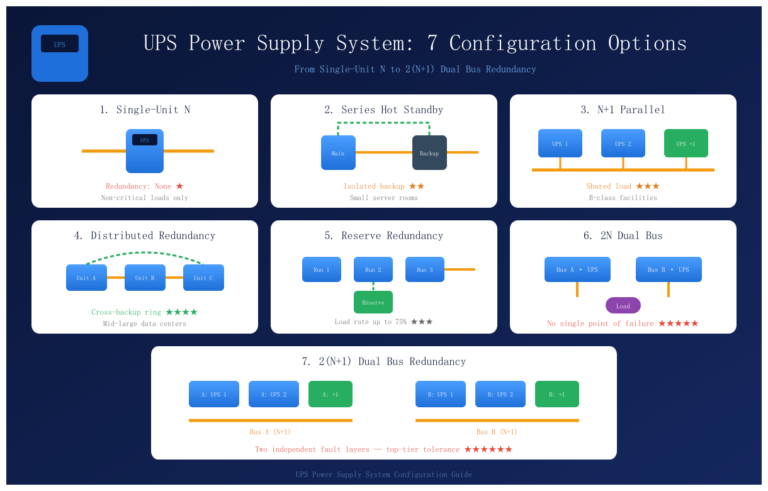
The UPS bridges power loss seamlessly and buys time for generator startup.
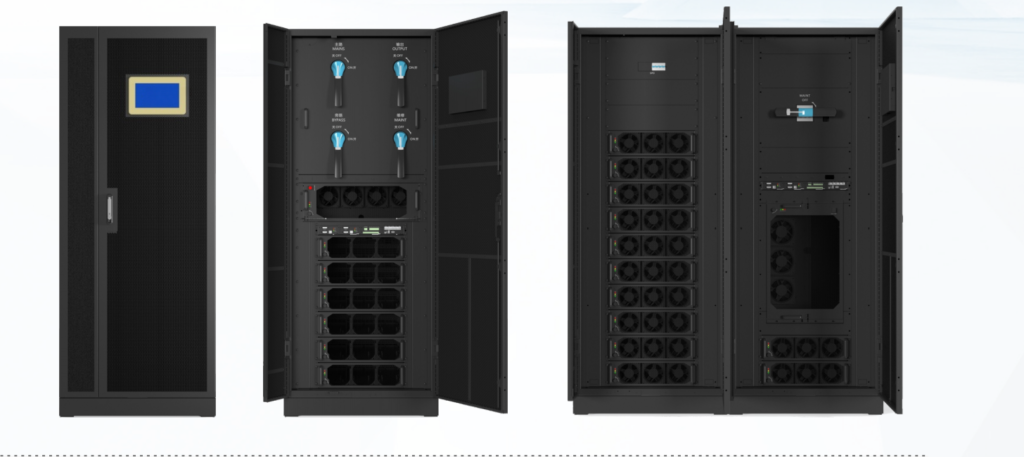
Equipment list: UPS units (tower or modular), battery strings (VRLA or lithium) with cabinets or racks, battery monitoring units, and maintenance bypass.【UPS】
Selection tips:
Data center heat is 95% sensible heat. Precision cooling — high airflow, small enthalpy difference, sensible heat ratio ≥ 0.9 — holds temperature within ±1℃ and humidity within ±5%.【source】
Equipment list: CRAC/CRAH units (room-level, in-row, or rack-mounted), humidifiers, fresh-air exchangers (for positive pressure and CO₂ dilution), leak detection ropes, condensate drains, and ducting.
Selection tips:
Cabling is the vascular system of a data center, carrying every network and fiber link.
Equipment list: Cat 6/6A UTP, OM3/OM4 multimode and single-mode fiber, copper and fiber patch panels, ODFs, network racks, KBG steel conduit, 300×100 metal trays, fiber troughs, and cable managers.
Selection tips: Class B needs redundant backbone paths; Class A needs redundant horizontal cabling too. Prefer overhead cabling — trays above the racks keep the underfloor plenum clear for airflow. Also separate power and data physically, with ≥ 300mm spacing to prevent crosstalk.【source】
Racks carry the IT hardware; aisle containment cuts energy waste and kills hot spots.
Equipment list: 42U racks (600×1200×2000mm or 600×1000mm), intelligent PDUs, containment roofs with fire-release panels, aisle end doors, grounded base plates, temperature/humidity and leak sensors, and vertical cable managers.
Selection tips: containment sharply reduces PUE by stopping air mixing. However, the roof panels must auto-open on fire alarm — otherwise fire acceptance fails. Plan rack loading, PDU outlets, and cable depth up front; do not fish cables in later.
Data centers ban water, foam, and dry powder. Only clean-agent gas suppression protects IT equipment.
Equipment list: HFC-227ea (FM-200) or IG541 systems (pipework or cabinet type), VESDA aspirating smoke detection, point smoke and heat detectors, fire linkage panel, fire dampers, emergency lighting (≥ 5lx in aisles), and breathing apparatus.
Selection tips: